How to choose a PC case and cooling for gaming: clearances, airflow, fans and AIOs
To choose a case and cooling for a gaming PC, start with measurements: the motherboard size, the graphics card length and the CPU cooler height all have to fit within the limits on the case's spec sheet. Airflow, fans and the air-versus-liquid decision come next, and a CPU sitting in the 90s °C under load is not a fault on its own.
In short
- Three limits on the case page decide most builds: maximum GPU length, maximum cooler height and supported radiator sizes. A front radiator can shorten the GPU allowance.
- A straight path, in at the front and out at the rear and top, is enough for most gaming cases; with filtered intakes, slight positive pressure keeps dust down.
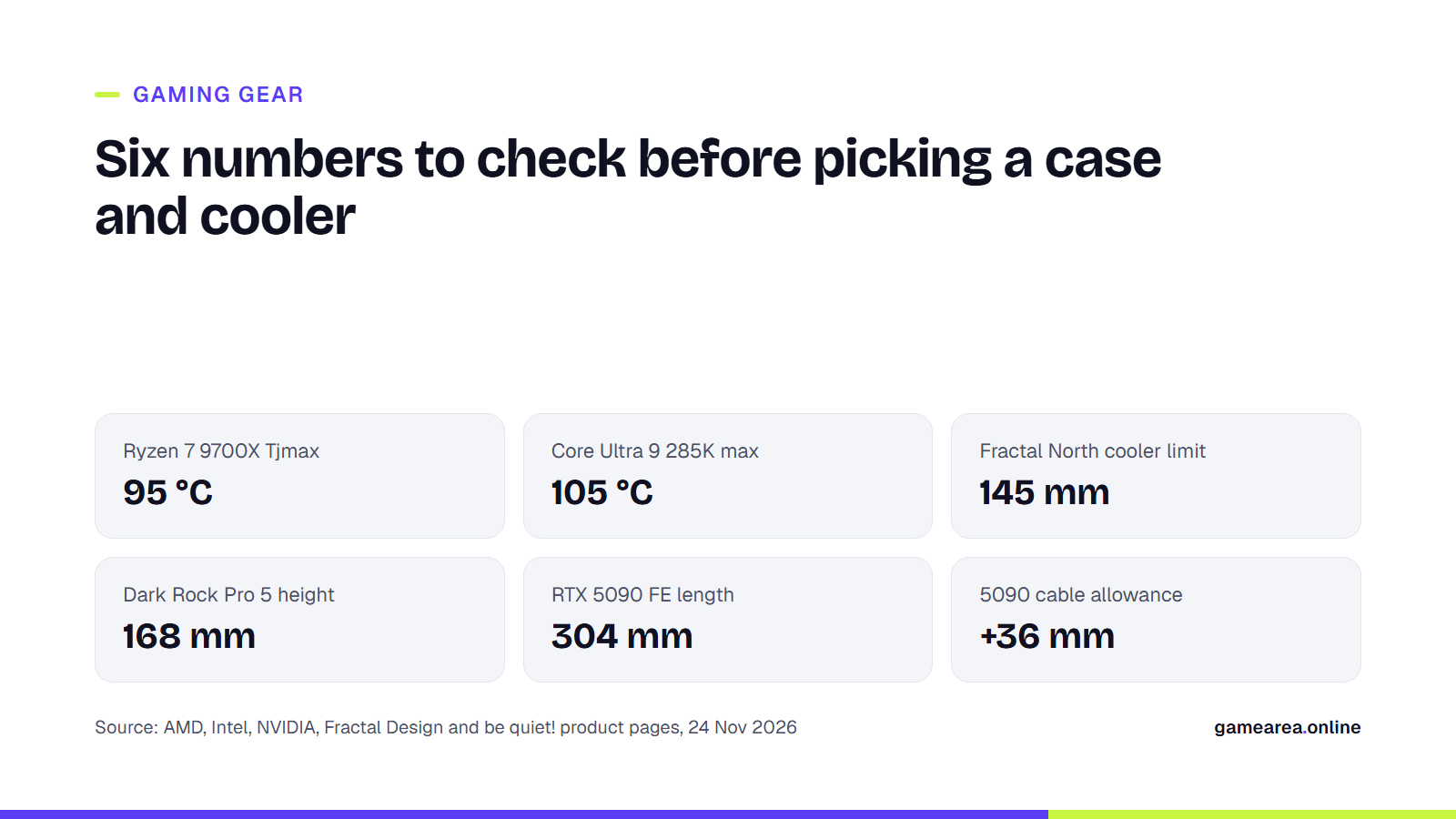
- AMD lists 95 °C as the maximum operating temperature for the Ryzen 7 9700X and Ryzen 7 9800X3D, and 89 °C for the Ryzen 7 7800X3D. Reaching that limit under load is part of the design.
- An all-in-one liquid cooler (AIO) is not better in every build; it earns its place with hot-running CPUs and in cases where a tower cooler will not fit.
Which measurements matter when choosing a PC case?
The motherboard is the first filter. Corsair gives standard ATX as 305 × 244 mm, Micro ATX as 244 × 244 mm and Mini-ITX as 170 × 170 mm. A Micro ATX board also fits an ATX case, but not the other way round. Mini-ITX cases are compact, yet they noticeably narrow your choice of graphics card, cooler and power supply.
The graphics card comes second. Case spec sheets carry a line such as "GPU max length", and that number is not always fixed. Fractal Design rates its North case for cards up to 355 mm, but only 300 mm once a 360 mm radiator sits in the front. NVIDIA's GeForce RTX 5090 Founders Edition is 304 mm long, so in that case it will not fit alongside a front 360 mm radiator. NVIDIA also asks for room for a three-slot (61 mm) card plus 36 mm of extra space for the power cables. The cable leaving the side of the card is the first thing to hit the side panel in a narrow case.
The third measurement is CPU cooler height. The North takes tower coolers up to 145 mm, while the be quiet! Dark Rock Pro 5 stands 168 mm tall with its fans, so that cooler will not fit with the panel closed. The same spec page lists a maximum power supply length (255 mm for the North); high-wattage units can be long, so check it against the figures in our guide to choosing a gaming power supply.
How should airflow work inside a gaming case?
The basic layout is simple: cool air comes in at the front or bottom, warm air leaves at the rear and top. Pointing fans that way means the heat from the GPU and CPU is pushed out instead of circulating. The front panel matters most here. A perforated mesh front lets air reach the fans directly; with a solid glass or closed panel, air has to squeeze in through narrow side gaps, so the fans spin faster, and louder, for the same cooling. A glass side panel is not a problem; what counts is an open intake.
Positive or negative pressure?
Corsair defines positive pressure as pulling more air in than the fans push out, and negative pressure as the reverse. With positive pressure the surplus escapes through the case's gaps, so dust only enters through filtered intakes. Negative pressure clears warm air quickly, but the case then draws air, and dust, through unfiltered slots, expansion covers and panel seams. In practice, keep the combined airflow of the intake fans a little above the exhaust and clean the intake filters regularly. Matching fan counts is not enough on its own; what matters is how much air each fan actually moves.
Why do fan size, PWM and static pressure matter?
The most common case fan sizes are 120 and 140 mm. A larger fan can move the same air at lower speed, so it is usually quieter. be quiet! shows this with its own data: the 135 mm fan on the Dark Rock Pro 5 is rated at 68.7 CFM, the 120 mm fan at 52.5 CFM. The smaller fan, however, has the higher static pressure: 2.48 mmH₂O against 1.82 mmH₂O.
The two figures describe different jobs. Airflow (CFM or m³/h) says how much air a fan moves through an open intake or exhaust. Static pressure (mmH₂O) says how well it pushes air through resistance such as heatsink fins, a radiator or a dense filter. That is why Arctic describes its P12 PWM PST as optimised for static pressure and recommends it for heatsinks and radiators; it lists 56.3 CFM and 2.2 mmH₂O at 1,800 rpm.
Check the connector too. With a 4-pin PWM fan the motherboard sets the speed through a separate signal wire rather than by lowering voltage, so the fan can run very slowly. Arctic's fan covers 200–1,800 rpm and stops completely when the PWM signal drops below 5%. 3-pin fans are voltage-controlled and may not offer the same range at low speed. Setting a BIOS fan curve against CPU and GPU temperature is the cheapest way to a PC that is quiet at idle and cool enough in games.
Air cooler or AIO liquid cooler?
The CPU and the case decide together. AMD states the recommended cooler type on its product pages: a "premium air cooler" for the Ryzen 5 7600X and Ryzen 7 9700X, and a liquid cooler for the Ryzen 7 9800X3D and Ryzen 7 7800X3D. A good tower cooler is enough for a mid-range gaming CPU; on chips with high heat density an AIO leaves more headroom. We cover the CPU side in our guide to choosing a gaming CPU.
The real advantage of an AIO is that it carries heat away from the socket to a radiator at the edge of the case. You notice it when a big tower will not fit under the height limit, or when the CPU spends long stretches at high power. There is a price: the pump is another moving part and another noise source, and a front radiator can cut into GPU clearance. An air cooler's only moving part is its fan, which is easy to replace if it fails.
Where should the radiator and pump go?
Corsair's installation guide explains that a closed liquid loop always holds a little air, and the aim is to trap it in the radiator rather than the pump. The radiator therefore belongs above the pump, and the top of the case is the safest spot. If you mount it at the front, keep the tubes at the bottom so the top end of the radiator sits above the pump. Air passing through the pump causes noise and can wear it out over time.
What CPU temperature is normal for gaming? Is 95 °C OK?
Modern CPUs are built to boost until they reach a temperature limit. AMD gives a maximum operating temperature (Tjmax) of 95 °C for the Ryzen 5 7600X, Ryzen 7 9700X and Ryzen 7 9800X3D, and 89 °C for the Ryzen 7 7800X3D. AMD's support page notes that when a processor reaches that limit its power and performance are also at their limit, so seeing 95 °C under heavy load is the ceiling of the boost algorithm, not a fault.
On Intel's side, the Core Ultra 9 285K has a maximum operating temperature of 105 °C. Intel's support article says that when a core exceeds its limit the processor cuts power and frequency (throttling), and if that is not enough it shuts down to avoid permanent damage. Intel also notes that hitting the maximum under turbo or sustained load is not necessarily a problem, and that temperature alone does not prove cooling is inadequate. What to watch instead is whether clock speeds drop noticeably during play, and how loud the fans get trying to prevent it.
How do graphics cards cool, and does GPU sag matter?
Most graphics cards dump their heat inside the case, so case airflow directly affects GPU temperature. NVIDIA lists a maximum GPU temperature of 90 °C for the RTX 5090 and notes that leaving space equal to one empty expansion slot around the card typically improves airflow. Do not block the card's fans with cables, drive cages or a second card. For the rest of the decision, see our guide to choosing a graphics card.
Long, heavy cards can droop in the PCIe slot over time. Corsair notes that reinforced PCIe slots do not always prevent this and that a support bracket under the card is the most practical fix. Vertical mounting with a riser cable also takes the load off the slot, but a vertical card sitting too close to the side glass can starve its own fans of air.
What about thermal paste, dust filters and noise?
The application method matters less than people think. Arctic says paste can go on as a dot, spread, or in a pattern; what matters is that a thin layer covers the whole surface of the processor. If you remove and refit a cooler, clean off the old layer completely and apply fresh paste; a dried-out, thick or patchy layer hurts heat transfer.
Dust filters are the least discussed and hardest-working part of a case. The North has filters on the front and on the power supply intake; when shopping, check that the filters come out and can be washed. A clogged filter narrows the intake and can quietly turn positive pressure into negative.
When comparing noise, check the speed the maker measured at. be quiet! quotes 8.9, 16.3 and 23.3 dB(A) for the Dark Rock Pro 5 at 50%, 75% and 100% fan speed; a spread like that is more honest than a single number. Because test conditions differ between manufacturers, comparing two brands' dB(A) figures directly can mislead.
| Product | Figure | Why it matters |
|---|---|---|
| Fractal North | 355 mm GPU (300 mm with a front 360 mm radiator), 145 mm cooler, 255 mm PSU | Radiator placement changes the other limits |
| NVIDIA RTX 5090 FE | 304 mm long, 3-slot (61 mm) space, +36 mm for cables, max 90 °C | Read the card size against the case limit |
| be quiet! Dark Rock Pro 5 | 168 mm tall; 8.9 / 16.3 / 23.3 dB(A) | Large towers may not fit mid-size cases |
| Arctic P12 PWM PST | 200–1,800 rpm, 56.3 CFM, 2.2 mmH₂O | Pressure-focused fan for heatsinks and radiators |
| AMD Ryzen 7 9700X / 9800X3D / 7800X3D | Tjmax 95 / 95 / 89 °C | Reaching this under load is normal |
| Intel Core Ultra 9 285K | Max operating temperature 105 °C | At the limit the CPU slows first, then shuts down |
| Source: manufacturers' product and support pages, 24 Nov 2026. | ||
Frequently asked questions
How many fans does a gaming PC need?
For a mid-range gaming build, two front intakes and one rear exhaust are often enough. With a powerful graphics card or a top-mounted radiator, adding a top exhaust helps. More than the fan count, what matters is that total intake airflow is slightly higher than exhaust and that every intake is filtered.
Is AIO liquid cooling better than air cooling?
Not always. AMD recommends a premium air cooler for the Ryzen 7 9700X and a liquid cooler for the Ryzen 7 9800X3D. Because an AIO moves heat to a radiator, it helps with high-power CPUs and in cases where a tower cooler will not fit. The pump, though, adds a failure point and noise; a good tower cooler suits most gaming PCs.
Will 95 °C damage my Ryzen CPU?
AMD lists 95 °C as the maximum operating temperature for models such as the Ryzen 7 9700X and 9800X3D, and the processor limits its own power and performance at that point. Seeing that value under heavy load is not a fault. If the CPU sits there at idle or in light games, check the cooler mounting and the thermal paste.
Is a glass-front case bad for gaming?
With a fully closed glass front, air can only enter through side gaps, so the fans have to spin faster for the same cooling, which raises noise. A case with a perforated mesh front usually runs cooler and quieter. Glass on the side panel, by contrast, does not affect airflow.
Sources
- AMD — AMD Ryzen 7 9700X Official source
- AMD — AMD Ryzen 7 9800X3D Official source
- AMD — AMD Ryzen 7 7800X3D Official source
- AMD — AMD Ryzen 5 7600X Official source
- AMD — Troubleshooting CPU Performance and Temperature Issues Official source
- Intel — Information about Temperature for Intel Processors Official source
- Intel — Intel Core Ultra 9 Processor 285K specifications Official source
- NVIDIA — GeForce RTX 5090 Official source
- Fractal Design — North Official source
- be quiet! — Dark Rock Pro 5 Official source
- ARCTIC — P12 PWM PST Official source
- ARCTIC — How do I apply thermal paste? Official source
- Corsair — ATX vs MicroATX vs Mini-ITX: what's the difference? Official source
- Corsair — Positive pressure vs negative pressure: which is best for a gaming PC? Official source
- Corsair — How should you mount your AIO? Official source
- Corsair — How do I avoid GPU sag? Official source
How this content was prepared
Prepared with AI assistance from the sources listed, key facts checked against official sources, not copied verbatim. Our AI principles
GAMEAREA Editörlüğü