How to choose a graphics card for gaming: VRAM, ray tracing, DLSS/FSR/XeSS, power supply and case
When you choose a desktop graphics card, whether it fits in your case and whether your power supply can feed it matter as much as the model name. This guide shows which lines to check on NVIDIA, AMD and Intel's official spec pages for VRAM, ray tracing, DLSS/FSR/XeSS, power supply and size; it's a checklist, not a ranking.
In short
- The most concrete guide to how much VRAM you need is a game's official requirements: Indiana Jones and the Great Circle recommends cards like the RTX 2060 Super 8 GB for 1080p low settings, and 12 GB cards for 1440p high settings.
- DLSS Super Resolution works from the RTX 20 series onwards; Frame Generation is on the RTX 40 and 50 series, and Multi Frame Generation only on the RTX 50 series.
- AMD's full FSR "Redstone" suite runs on the RX 9000 series; on the RX 6000 and 7000 series only the ML-based upscaling works.
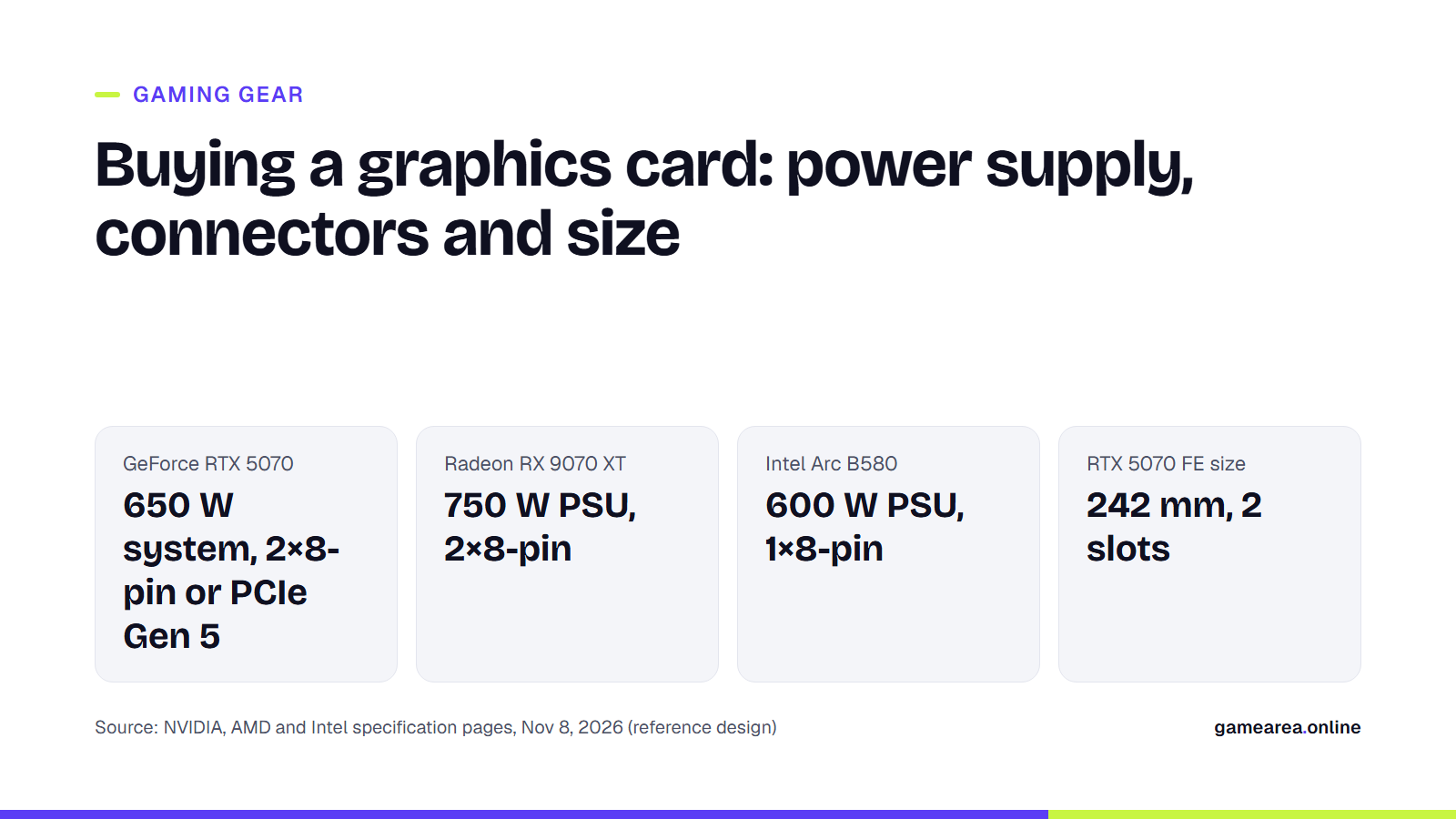
- For the power supply, the manufacturer's recommendation is what counts: 650 W for the RTX 5070, 750 W for the RX 9070 XT and 600 W for the Arc B580.
How much VRAM do you need, and how does it relate to resolution?
NVIDIA, AMD and Intel don't publish a VRAM threshold per resolution. So the most useful reference is the official system requirements of the games you want to play. The Steam page for Indiana Jones and the Great Circle is a good example: the minimum requirements list a GeForce RTX 2060 Super 8 GB, Radeon RX 6600 8 GB or Intel Arc A580 for 1080p, low settings and a 60 FPS target; the recommended requirements list a GeForce RTX 3080 Ti 12 GB or Radeon RX 7700 XT 12 GB for 1440p, high settings and 60 FPS. In the same game, the memory of the recommended cards goes up as resolution and settings rise.
On card pages, VRAM is in the memory configuration line. Current examples: NVIDIA lists 16 GB for the RTX 5070 Ti and 12 GB GDDR7 for the RTX 5070; AMD lists 16 GB GDDR6 for the Radeon RX 9070 XT; Intel lists 12 GB GDDR6 for the Arc B580. Because board partners' models can differ from the reference design, check the memory line of the card you're buying on the retailer's page as well. Laptops are a different story; there the power limit comes into play too, and we covered that separately in our gaming laptop guide.
Is ray tracing support a must now?
For some games, yes. The Steam page for Indiana Jones and the Great Circle notes that hardware ray tracing is required in both the minimum and recommended requirements; a card without ray tracing hardware doesn't even meet this game's lowest requirement. All three current lines offer this support: NVIDIA talks about fourth-generation RT cores in the RTX 50 series, AMD about 64 Ray Accelerators in the RX 9070 XT, and Intel about 20 ray tracing units in the Arc B580. Because these numbers belong to different architectures, they can't be compared one-to-one across brands.
What is the difference between DLSS, FSR and XeSS?
All three are upscaling technologies that render the game at a lower resolution and reconstruct a higher-resolution image, and all three have a frame generation feature that inserts generated frames in between. The real difference is which feature works on which card.
According to NVIDIA's DLSS support table, Super Resolution, Ray Reconstruction and DLAA work on all of the RTX 20, 30, 40 and 50 series. Frame Generation is on the RTX 40 and 50 series; Dynamic Multi Frame Generation and DLSS 5's 3D-guided neural rendering feature are only on the RTX 50 series. NVIDIA says Multi Frame Generation, exclusive to the RTX 50 series, can generate up to five additional frames for every rendered frame. We covered which games get DLSS 5 first in a separate news story.
On the AMD side, FSR "Redstone" is a machine learning-based suite made up of FSR Upscaling, Frame Generation, Ray Regeneration and Radiance Caching. According to AMD, the full suite runs on the RX 9000 series and above, while on the RX 6000 and RX 7000 series only the upscaling part can be used. Frame generation in the older FSR 3 is supported from the RX 5000 series onwards. AMD also states that FSR has to be integrated by the game developer and that it doesn't provide technical support for FSR on other manufacturers' cards.
Intel's XeSS family includes XeSS Super Resolution, XeSS Frame Generation, and XeSS Multi-Frame Generation, which inserts up to three frames between two rendered frames. All three manufacturers also recommend a latency reduction technology alongside frame generation: NVIDIA Reflex, AMD Radeon Anti-Lag 2 and Intel Xe Low Latency.
Which power supply is enough, and which cables do you need?
The spec page has two separate values: the card's own power draw and the power supply recommended for the whole system. According to NVIDIA, that's 250 W for the card and 650 W for the system with the RTX 5070, and 300 W and 750 W with the RTX 5070 Ti. AMD gives 304 W typical board power and a 750 W minimum power supply for the RX 9070 XT. Intel lists 190 W card power and a 600 W minimum power supply for the Arc B580. In a footnote, NVIDIA explains that it calculates its figure for a system with a Ryzen 9 9950X processor, that your needs may vary with your configuration, and that it recommends a PCIe CEM 5.1-compliant power supply.
Compare the connectors with your power supply too. For the RTX 5070 and RTX 5070 Ti, NVIDIA requires two PCIe 8-pin cables with the included adapter, or one PCIe Gen 5 cable rated at 300 W or more. On AMD's RX 9070 XT page the additional power connector is 2×8-pin; Intel's Arc B580 reference card uses 1×8-pin. NVIDIA stresses that the specifications of cards on sale can vary by board partner; for models from makers such as ASUS, MSI or Sapphire, check the power and connector lines on that model's own page.
Will the card fit in your case?
Dimensions are given for the reference design and can change in a board partner's model. NVIDIA lists the RTX 5070 Founders Edition at 242 mm long, 112 mm wide and 2 slots thick; for the RTX 5070 Ti, it leaves the dimensions to the board partners. Intel's Arc B580 reference card is 272 × 115 mm and 2 slots. AMD's RX 9070 XT page doesn't state the card's dimensions. Compare the maximum graphics card length given by your case manufacturer with the card's length, leave enough room for the power cable to plug in without bending, and note how many slots the card takes up.
How do you match a graphics card with a monitor?
The card's display outputs need to be compatible with the monitor's inputs. NVIDIA lists the RTX 5070 family with 3 DisplayPort 2.1b and 1 HDMI 2.1b, and says it can output up to 480 Hz at 4K with DSC. The RX 9070 XT has DisplayPort 2.1a and HDMI 2.1b; the Arc B580 has HDMI 2.1 and DisplayPort 2.1 outputs and HDMI VRR support. If you're buying a high-refresh-rate 1440p or 4K monitor, look at the card class recommended for that resolution in your games' official requirements, and confirm that the monitor's VRR technology is compatible with your card. We covered the monitor side of Hz, response time and VRR labels in our gaming monitor guide.
| What to check | On the spec page | Official example | Why it matters |
|---|---|---|---|
| VRAM | Memory configuration | RTX 5070: 12 GB GDDR7; RX 9070 XT: 16 GB GDDR6 | High resolution and texture settings |
| Ray tracing | Supported technologies | Indiana Jones and the Great Circle: hardware RT required | Minimum requirement for some games |
| Upscaling and frame generation | Manufacturer's technology page | DLSS Frame Generation: RTX 40 and 50; full FSR "Redstone": RX 9000 | Frame rate |
| Power supply | System power / minimum PSU | RTX 5070: 650 W; RX 9070 XT: 750 W; Arc B580: 600 W | Stable operation |
| Power connector | Supplementary power connectors | RTX 5070: 2×8-pin (with adapter) or 300 W PCIe Gen 5; Arc B580: 1×8-pin | Power supply compatibility |
| Size | Card dimensions | RTX 5070 FE: 242 mm, 2 slots; Arc B580: 272 mm, 2 slots; RX 9070 XT: not stated on the page | Case fit |
| Source: NVIDIA, AMD and Intel product and technology pages, Indiana Jones and the Great Circle Steam page, 8 November 2026. Values are for the reference design; prices are not included in this table. | |||
Frequently asked questions
Is a 650 W power supply enough for an RTX 5070?
The required system power NVIDIA gives for the RTX 5070 is 650 W. However, this figure is calculated for a system with a Ryzen 9 9950X; a different configuration may need more power. Check the board partner's own figure as well.
Does DLSS work on AMD or Intel cards?
No. NVIDIA's DLSS support table lists only GeForce RTX series. AMD cards use FSR and Intel cards use XeSS.
Do RTX 30 series cards have Frame Generation?
No. According to the DLSS table, Frame Generation is on the RTX 40 and 50 series; on the RTX 30 series you can use Super Resolution, Ray Reconstruction and DLAA.
Is 8 GB of VRAM enough?
It depends on the game and the resolution. For example, Indiana Jones and the Great Circle lists the RTX 2060 Super 8 GB and RX 6600 8 GB in its minimum requirements for 1080p low settings, and the 12 GB RTX 3080 Ti and RX 7700 XT in its recommended requirements for 1440p high settings.
Sources
- NVIDIA — GeForce RTX 5070 Family Official source
- NVIDIA — NVIDIA DLSS Official source
- AMD — AMD Radeon RX 9070 XT Official source
- AMD — AMD FSR Official source
- Intel — Intel Arc B580 Graphics – Product Specifications Official source
- Intel — Intel Arc Graphics Gaming Technologies (XeSS) Official source
- Bethesda Softworks / Steam — Indiana Jones and the Great Circle – Steam sistem gereksinimleri Official source
How this content was prepared
Prepared with AI assistance from the sources listed, key facts checked against official sources, not copied verbatim. Our AI principles
GAMEAREA Editörlüğü