How to choose a TV for gaming: HDMI 2.1, VRR, ALLM, HDR, and OLED or Mini LED
When you buy a TV for a PS5 or Xbox Series X, the "HDMI 2.1" on the box doesn't guarantee anything on its own; even HDMI's licensing body says the features of this version are optional. This guide uses official sources to show which lines of the spec sheet to check for 4K 120 Hz, VRR, ALLM, eARC and HDR, and which settings to turn on in the console.
In short
- According to the HDMI Licensing Administrator, every HDMI 2.1 feature is optional; a manufacturer that says "HDMI 2.1" must also state which features it supports.
- Microsoft requires an HDMI 2.1 TV and an Ultra High Speed HDMI cable for 4K 120 Hz on Xbox Series X; Sony also recommends connecting the PS5 to the TV's HDMI 2.1 input.
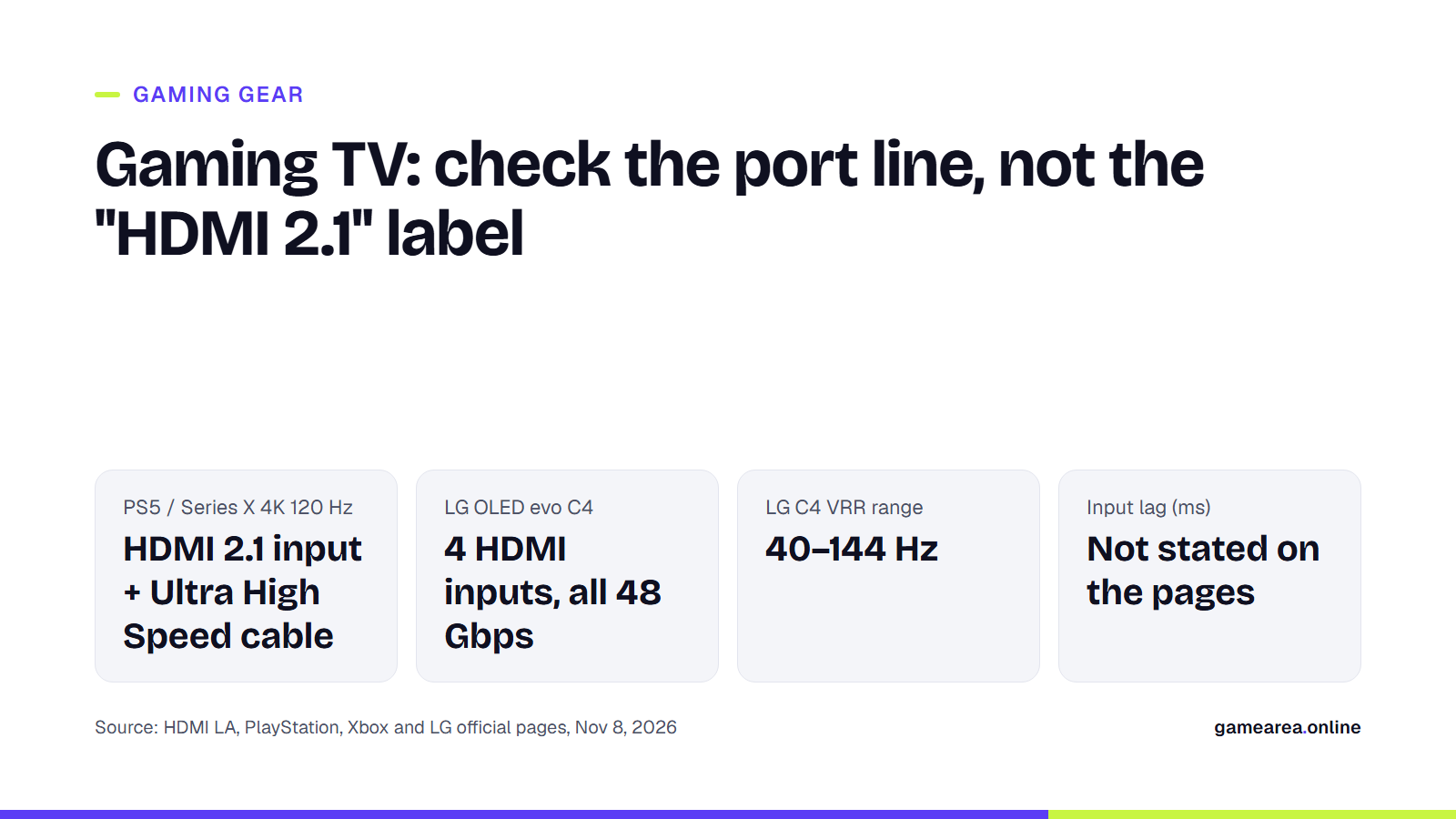
- Example: all four HDMI inputs on the LG OLED evo C4 are 48 Gbps and support 4K 120 Hz, VRR and ALLM; eARC is on HDMI 2 only.
- LG writes that the Pixel Cleaning function on its OLED panels reduces the risk of burn-in but doesn't eliminate it completely.
Does every TV labelled "HDMI 2.1" deliver 4K 120 Hz?
No. According to HDMI LA's FAQ, a device only has to support at least one feature of the specification to count as an HDMI 2.1 product; the manufacturer decides which ones to include based on price and target market. Even a product without FRL and 48 Gbps support, using only the 18 Gbps TMDS link of the HDMI 2.0 era, can be sold as HDMI 2.1 as long as it complies with the rules. In return, the manufacturer must list the supported features next to the version number, and that's where you should look.
The HDMI line in the spec table and the user manual show how many inputs carry these features. For the OLED evo C4, LG states that all four inputs support 4K 120 Hz, eARC, VRR, ALLM and QMS and that all four have 48 Gbps of bandwidth; eARC, however, is only on input 2. If the table doesn't break down the inputs, ask the manufacturer which ports deliver 4K 120 Hz. The cable is part of the equation too: HDMI LA defines the Ultra High Speed HDMI cable, introduced with HDMI 2.1, as the cable suited to connections using up to 48 Gbps of bandwidth.
What do VRR, ALLM and eARC do?
VRR (variable refresh rate) lets the console or PC send each frame as soon as it's ready. As HDMI LA explains, when the graphics card can't finish a frame in time, the source either repeats the previous frame or shows a partly drawn one; that's where stutter and tearing come from. Microsoft's Xbox support page states that VRR can only be used with a TV that supports HDMI-VRR or AMD FreeSync.
ALLM (Auto Low Latency Mode) saves you from switching game mode on and off manually in the menus: the console sends a signal, the TV switches to its low-latency mode, and when you go back to a film app it returns to the previous picture mode. Microsoft's caveat is worth noting: low latency is achieved by the TV turning off some of its picture processing features, so HDR colours may look more washed out. eARC sends the TV's audio to a soundbar or AV receiver over a single HDMI cable; according to HDMI LA, it can carry uncompressed 5.1 and 7.1 audio as well as Dolby Atmos, Dolby TrueHD and DTS:X.
How do you check input lag and game mode?
Input lag is the time between pressing a button and the response on screen; but on the LG C4 and Samsung QN80F pages we looked at, this value isn't given in milliseconds. The TV should have ALLM or a game mode; on LG it's called Game Optimizer, while Samsung has AI Auto Game Mode, which detects the game genre and adjusts the settings, plus the in-game Game Bar menu. The ALLM setting on the console should be on and the TV's software up to date. Sony's note matters too: on PS5, even if you turn ALLM off, the TV still switches to low-latency mode while there is VRR output; to turn ALLM off completely you also have to turn off VRR.
Read the 144 Hz claim correctly as well: Samsung notes that 4K 144 Hz on the QN80F only works in PC games that support it, and LG notes that on the C4 it only works with games or PC inputs that support 144 Hz.
Which HDR format matters for gaming: HDR10, Dolby Vision, HGIG?
According to Microsoft, Xbox Series X|S has a "Dolby Vision for Gaming" setting alongside HDR10; when connected to a Dolby Vision TV, the console also automatically enhances existing HDR10 and Auto HDR games for this format. According to Xbox Wire, TVs that haven't been updated for this feature may show latency issues with Dolby Vision in games. Sony's PS5 video output page, on the other hand, has no game setting for Dolby Vision; it has options for turning HDR on and an adjustment screen. LG's C4 page lists Dolby Vision, HDR10 and HLG as HDR formats and an HGIG mode for gaming.
HGIG is a mode that takes the brightness decision away from the TV's dynamic tone mapping and leaves it to the game's own HDR calibration. According to LG, this option sits in the tone mapping compensation menu within Game Optimizer and can only be selected when a supported console connected over HDMI is detected. Because the TV's own tone mapping is reduced, the picture may look darker, and not every console or game supports HGIG. If you've switched to HGIG, it makes sense to redo the console's HDR adjustment screen in that mode. We covered the monitor side of the same labels in our gaming monitor guide.
OLED or Mini LED?
The two technologies build contrast in different ways. LG promotes the OLED evo C4 with the promise of perfect blacks and infinite contrast. Samsung, for its part, explains that the QN80F's backlight is made up of precisely controlled Mini LED zones, which increase contrast and brightness; the number of zones and the peak brightness figure aren't given on the page we looked at.
On burn-in, the most solid reference is the manufacturer's own wording. According to LG, Pixel Cleaning on OLED evo TVs runs automatically after a certain amount of use when the TV is switched off and left plugged in, and can also be started manually from the OLED Care menu. In the same place, the company adds that this function reduces the risk of burn-in but doesn't eliminate it, and that static images should be avoided for long periods. Samsung's Mini LED page contains no statement about burn-in.
How do you turn on 120 Hz and VRR on PS5 and Xbox Series?
On PS5, go to Settings > Screen and Video > Video Output. The connected display's resolution, VRR and HDR information is here, along with the 120 Hz Output, VRR and ALLM settings. If you don't get a 4K 120 Hz picture, or the signal shows as 1080p 120 Hz, Sony recommends checking the following: that the TV supports 4K 120 Hz and has up-to-date software, that you're using the cable from the box or an Ultra High Speed cable suitable for 4K 120 Hz, that the console is connected directly to an HDMI 2.1 input, and whether the TV has a separate setting that has to be enabled for HDMI 2.1. If the screen flickers, lowering Video Transmission Rate to -1 or -2 is one fix, but this also limits 4K 120 Hz output.
On Xbox Series X, press the Xbox button to open the guide and go to Profile & system > Settings > General > TV & display options; set the resolution to 4K UHD and the refresh rate to 120 Hz. A 2-metre Ultra High Speed cable comes in the box. On Series S, or with a TV that doesn't support HDMI 2.1, 120 Hz can be enabled at a lower resolution. The VRR and ALLM options are in the video modes section of the same menu; you can see which features your TV supports on the 4K TV details screen.
| What to check | Where to look | Official example | Why it matters |
|---|---|---|---|
| Number of inputs with 4K 120 Hz | Spec table, HDMI line and manual | LG C4: 4 inputs, all 48 Gbps and 4K 120 Hz | 4K 120 Hz on PS5 and Series X |
| VRR range | Gaming features | LG C4: 40–144 Hz | Stutter and tearing |
| ALLM / game mode | Gaming features | LG Game Optimizer, Samsung AI Auto Game Mode | Latency |
| eARC input | HDMI line | LG C4: HDMI 2 only | Soundbar and AV receiver |
| HDR formats | Picture features | LG C4: Dolby Vision, HDR10, HLG and HGIG mode | HDR picture in games |
| Input lag (ms) | Product page | Not stated on the LG C4 and Samsung QN80F pages | Competitive gaming |
| Source: HDMI Licensing Administrator, PlayStation and Xbox support pages, LG and Samsung product pages, 8 November 2026. Prices were not taken from these pages. | |||
Frequently asked questions
Do you need an HDMI 2.1 TV for PS5?
Yes, if you want 4K 120 Hz. When troubleshooting 4K 120 Hz, one of the first things Sony asks you to check is whether the console is connected to the TV's HDMI 2.1 input, and whether a suitable Ultra High Speed cable is being used.
Does every HDMI 2.1 TV have ALLM?
No. The PlayStation support page says that not all HDMI 2.1 TVs have ALLM and that you should check the display's manual; HDMI LA also says 2.1 features are optional.
Can gaming on an OLED TV cause burn-in?
The risk isn't zero. LG states that the Pixel Cleaning function reduces the risk of burn-in but doesn't eliminate it.
Why did the picture get darker when I turned on HGIG?
According to LG, HGIG reduces the TV's dynamic tone mapping and leaves brightness to the game's HDR calibration, so the picture can look darker.
Sources
- HDMI Licensing Administrator — What Does It Mean When Gear is Marketed as HDMI 2.1 Product? Official source
- HDMI Licensing Administrator — HDMI Specification Overview Official source
- HDMI Licensing Administrator — Variable Refresh Rate (VRR) Official source
- HDMI Licensing Administrator — Auto Low Latency Mode (ALLM) Official source
- HDMI Licensing Administrator — Enhanced Audio Return Channel (eARC) Official source
- Sony Interactive Entertainment — How to change PS5 console resolution Official source
- Microsoft / Xbox Support — Set up 4K gaming at 120 Hz on Xbox Series X Official source
- Microsoft / Xbox Support — Advanced video settings for Xbox consoles Official source
- Microsoft / Xbox Support — How to change the TV display settings on your Xbox Official source
- Xbox Wire — Dolby Vision Gaming Now Available on Xbox Series X|S Official source
- LG Electronics — How to set HGiG mode on an LG TV for HDR gaming Official source
- LG Electronics — 48 inch LG OLED evo C4 4K Smart TV (OLED48C44LA) Official source
- Samsung — 75" Class Neo QLED 4K Mini LED Smart TV, QN80F Official source
How this content was prepared
Prepared with AI assistance from the sources listed, key facts checked against official sources, not copied verbatim. Our AI principles
GAMEAREA Editörlüğü